Product Overview
Brand: BAOFENG
Color: Black
Features:
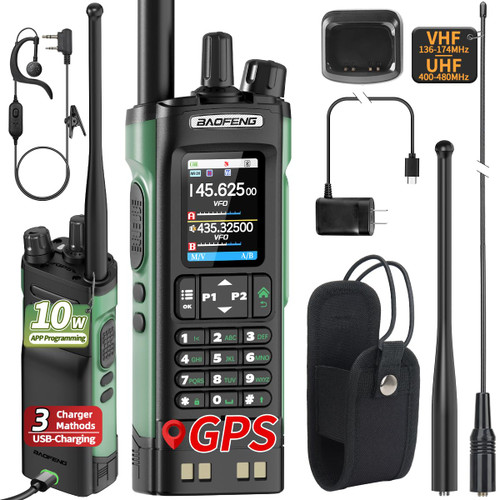
- Professional 10W Ham Radio: BF-5RH Pro offers GPS location sharing, ????(???????? ?.?.?), 8-band frequency range (VHF/1.25M/UHF/AM/FM), 640 channels in 10 zones, Frequency Match, IP54 Rugged, 1.8-inch color display, CTCSS , DCS, DTMF, BCL, TOT ,stopwatch... Make it perfect for all needs! Because there are too many functions, it does ??? ??????? ????? ??? ????????? ??????????. ??? ???????? ?? walkietalkiesoftware.com. Or Please refer to the picture to obtain the way to download CPS. If the radio functions unusually, contact us for firmware upgrade. ====e-ma-il===support at tidradio dot com to obtain CPS.
- GPS+NOAA Dual protection for safety: NOAA previews weather for early risk prevention. GPS shares your location instantly in danger for quick rescue. Same as BF-F8HP Pro, BF-5RH Pro offers NOAA and GPS functions. NOAA weather alert system gives real-time extreme weather updates, and GPS enables one-click distress location sharing. Ideal for disaster relief and outdoor activities
- 10 Zone+A/B band: 10 zones, 64 channels each—640 in total for quick team control. Instant zone switching fits any job. Dual Band control monitors two zone at once. Ideal for events or security. No more missed messages—just seamless, productive teamwork. Press # to switch the input method when naming zone
- 10W Long Range Communication:BAOFENG UV5RH Real 10 watt output provides you with longer transmission range and hit more repeaters. With fully charged 2500mAh battery, 10W power output, combined with the 1.8-inch antenna, significantly enhances signal transmission, ensuring stable and long-range communication. ??????? ??? ??? ??? ?????????? ?? ??????? ???????.What the F8HP PRO has, we all have. ----The functions are overly abundant and not suitable for beginners. If you want to experience the primary functions, you can purchase BAOFENG UV26 or UV5RM Ham Radio Handheld
- How to Program in CPS: BAOFENG 5RH Pro Ham Radio Handheld support manual and CPS programming, Chirp and Bluetooth programming aren't supported. Download the free CPS software and firmware from our website. ??? ???????? ?? walkietalkiesoftware.com→BAOFENG→5RH PRO(GPS). ??? ?????-????(???-????) ????????, ??? ???? ?? ??? ??? ???? ?????(???-???). ????>????>???? ?????
- How to use the GPS: Please use GPS in an open area. Long press side key 1 to switch the GPS function on/off. Long press the red Return key to open the GPS information page. (See instructions on pages 31-33.) GPS location sharing and requesting: You can send your own info to team members,or request theirs about location, direction, and distance. --Sharing and receiving GPS is via the DTMF function, so it must be on the same frequency and within the communication range. --Use the part of DTMF on CPS, to program the IDs of yours and team members' radio, and then set the contact ID. The self-ID of each radio must be different
- Note: In the GPS information interface, you can't communicate. Return to the walkie-talkie communication page. Transmitting is disabled while waiting to receive. If the other party gets your request, they will reply with your location info
- ??????? ??? ???????: We have a professional team to provide you with services and 24-hour support to ensure every customer's peace of mind and trust. Enjoy worry-free usage with Baofeng 5RH Pro, we provide Programmable PC software and 30-day no-questions-asked after-sale for complete peace of mind